Tracing with OpenTelemetry
Tracing in Fission
Tracing gives you a request-level view of how a call flows through Fission’s components — router, executor, function pod — and how long each step takes.
Fission instruments its components with OpenTelemetry and exports spans over OTLP to any compatible backend. Earlier releases used OpenTracing/Jaeger directly; that path has been replaced by OpenTelemetry, which is the only tracing system Fission ships today. Because OpenTelemetry speaks OTLP, you can still send traces to Jaeger (shown below) or to any vendor that accepts OTLP.
OpenTelemetry
OpenTelemetry is a set of APIs, SDKs, tooling and integrations that are designed for the creation and management of telemetry data such as traces, metrics, and logs. The project provides a vendor-agnostic implementation that can be configured to send telemetry data to the backend(s) of your choice. It supports a variety of popular open-source projects including Jaeger and Prometheus.
Fission Opentelemetry Integration
If you have OpenTelemetry installed, you can use it to collect traces and metrics from Fission.
The openTelemetry section in the Helm chart configures the OpenTelemetry SDK used by the Fission components.
The chart translates each value into a standard OTEL_* environment variable that is injected into every component pod, and these variables are propagated to function pods as well.
| Helm value | Environment variable | Description |
|---|---|---|
openTelemetry.otlpCollectorEndpoint | OTEL_EXPORTER_OTLP_ENDPOINT | Collector endpoint for OpenTelemetry (host:port). Tracing is disabled when this is empty. |
openTelemetry.otlpInsecure | OTEL_EXPORTER_OTLP_INSECURE | true/false; whether to skip TLS for the collector connection |
openTelemetry.otlpHeaders | OTEL_EXPORTER_OTLP_HEADERS | Comma-separated key-value pairs sent as headers on gRPC/HTTP export requests |
openTelemetry.tracesSampler | OTEL_TRACES_SAMPLER | Sampler for traces |
openTelemetry.tracesSamplingRate | OTEL_TRACES_SAMPLER_ARG | Argument for the sampler |
openTelemetry.propagators | OTEL_PROPAGATORS | Propagator(s) used to generate and read the trace-id header |
If you have not configured collector endpoint, you won’t be able to visualize traces.
Based on sampler configuration, you can observed trace_id in Fission component logs.
You can search with trace_id across Fission services logs in case of debugging or troubleshooting.
Many of the observability platforms such as DataDog, Dynatrace, Honeycomb, Lightstep, New Relic, Signoz, Splunk etc. support OpenTelemetry out-of-box, otlpHeaders can be used to configure the headers required by the observability platform.
You don’t need to setup up Opentelemtry Collector from scratch in that case.
If you feel any of the above options are not adequate, feel free to raise an issue or open a pull request.
Types of samplers
always_on- Sampler that always samples spans, regardless of the parent span’s sampling decision.always_off- Sampler that never samples spans, regardless of the parent span’s sampling decision.traceidratio- Sampler that samples probabalistically based on rate.parentbased_always_on- (default if empty) Sampler that respects its parent span’s sampling decision, but otherwise always samples.parentbased_always_off- Sampler that respects its parent span’s sampling decision, but otherwise never samples.parentbased_traceidratio- (default in chart) Sampler that respects its parent span’s sampling decision, but otherwise samples probabalistically based on rate.
Sampler Arguments
Each Sampler type defines its own expected input, if any. Currently we get trace ratio for the case of following samplers,
traceidratioparentbased_traceidratio
Sampling probability, a number in the [0..1] range, e.g. “0.1”. Default is 0.1.
Types of propagators
Based on the propagator type, OpenTelemetry will generate a trace id header.
tracecontext- W3C Trace Contextbaggage- W3C Baggageb3- B3 Singleb3multi- B3 Multijaeger- Jaeger uber-trace-id headerxray- AWS X-Ray (third party)ottrace- OpenTracing Trace (third party)
Propogator config is uselful, if you want to use different header from W3C Trace Context.
E.g. If you are using OpenTracing/Jaeger, you can set propagator to jaeger.
Sample OTEL Collector
We will be using the OpenTelemetry Operator for Kubernetes to setup OTEL collector.
To install the operator in an existing cluster, cert-manager is required.
Use the following commands to install cert-manager and the operator:
# cert-manager
kubectl apply -f https://github.com/jetstack/cert-manager/releases/latest/download/cert-manager.yaml

# open telemetry operator
kubectl apply -f https://github.com/open-telemetry/opentelemetry-operator/releases/latest/download/opentelemetry-operator.yaml
Once the opentelemetry-operator deployment is ready, we need to create an OpenTelemetry Collector instance.
The following configuration provides a good starting point, however, you may change as per your requirement:
kubectl apply -f - <<EOF
apiVersion: v1
kind: ConfigMap
metadata:
  name: otel-collector-conf
  namespace: opentelemetry-operator-system
  labels:
    app: opentelemetry
    component: otel-collector-conf
data:
  otel-collector-config: |
    receivers:
      # Make sure to add the otlp receiver.
      # This will open up the receiver on port 4317
      otlp:
        protocols:
          grpc:
            endpoint: "0.0.0.0:4317"
    processors:
    extensions:
      health_check: {}
    exporters:
      jaeger:
        endpoint: "jaeger-collector.observability.svc.cluster.local:14250"
        insecure: true
      prometheus:
        endpoint: 0.0.0.0:8889
        namespace: "testapp"
      logging:

    service:
      extensions: [health_check]
      pipelines:
        traces:
          receivers: [otlp]
          processors: []
          exporters: [jaeger]

        metrics:
          receivers: [otlp]
          processors: []
          exporters: [prometheus, logging]
---
apiVersion: v1
kind: Service
metadata:
  name: otel-collector
  namespace: opentelemetry-operator-system
  labels:
    app: opentelemetry
    component: otel-collector
spec:
  ports:
    - name: otlp # Default endpoint for otlp receiver.
      port: 4317
      protocol: TCP
      targetPort: 4317
      nodePort: 30080
    - name: metrics # Default endpoint for metrics.
      port: 8889
      protocol: TCP
      targetPort: 8889
  selector:
    component: otel-collector
  type: NodePort
---
apiVersion: apps/v1
kind: Deployment
metadata:
  name: otel-collector
  namespace: opentelemetry-operator-system
  labels:
    app: opentelemetry
    component: otel-collector
spec:
  selector:
    matchLabels:
      app: opentelemetry
      component: otel-collector
  minReadySeconds: 5
  progressDeadlineSeconds: 120
  replicas: 1 # increase for higher trace throughput or collector high availability
  template:
    metadata:
      annotations:
        prometheus.io/path: "/metrics"
        prometheus.io/port: "8889"
        prometheus.io/scrape: "true"
      labels:
        app: opentelemetry
        component: otel-collector
    spec:
      containers:
        - command:
            - "/otelcol"
            - "--config=/conf/otel-collector-config.yaml"
            # Memory Ballast size should be max 1/3 to 1/2 of memory.
            - "--mem-ballast-size-mib=683"
          env:
            - name: GOGC
              value: "80"
          image: otel/opentelemetry-collector:0.6.0
          name: otel-collector
          resources:
            limits:
              cpu: 1
              memory: 2Gi
            requests:
              cpu: 200m
              memory: 400Mi
          ports:
            - containerPort: 4317 # Default endpoint for otlp receiver.
            - containerPort: 8889 # Default endpoint for querying metrics.
          volumeMounts:
            - name: otel-collector-config-vol
              mountPath: /conf
          # - name: otel-collector-secrets
          #   mountPath: /secrets
          livenessProbe:
            httpGet:
              path: /
              port: 13133 # Health Check extension default port.
          readinessProbe:
            httpGet:
              path: /
              port: 13133 # Health Check extension default port.
      volumes:
        - configMap:
            name: otel-collector-conf
            items:
              - key: otel-collector-config
                path: otel-collector-config.yaml
          name: otel-collector-config-vol
EOF
Note: The above configuration is borrowed from the OpenTelemetry Collector traces example, with some minor changes.
Jaeger
We will using the Jaeger Operator for Kubernetes to deploy Jaeger. To install the operator, run:
kubectl create namespace observability
kubectl create -n observability -f https://github.com/jaegertracing/jaeger-operator/releases/download/v1.39.0/jaeger-operator.yaml
Note that you’ll need to download and customize the Role Bindings if you are using a namespace other than observability.
Once the jaeger-operator deployment in the namespace observability is ready, create a Jaeger instance, like:
kubectl apply -n observability -f - <<EOF
apiVersion: jaegertracing.io/v1
kind: Jaeger
metadata:
  name: jaeger
EOF
Check if the otel-collector and jaeger-query service has been created:
kubectl get svc --all-namespaces

NAMESPACE                       NAME                                                        TYPE        CLUSTER-IP      EXTERNAL-IP   PORT(S)                                  AGE
cert-manager                    cert-manager                                                ClusterIP   10.96.228.4     <none>        9402/TCP                                 7m50s
cert-manager                    cert-manager-webhook                                        ClusterIP   10.96.214.220   <none>        443/TCP                                  7m50s
default                         kubernetes                                                  ClusterIP   10.96.0.1       <none>        443/TCP                                  9m35s
kube-system                     kube-dns                                                    ClusterIP   10.96.0.10      <none>        53/UDP,53/TCP,9153/TCP                   9m33s
observability                   jaeger-agent                                                ClusterIP   None            <none>        5775/UDP,5778/TCP,6831/UDP,6832/UDP      3s
observability                   jaeger-collector                                            ClusterIP   10.96.48.27     <none>        9411/TCP,14250/TCP,14267/TCP,14268/TCP   3s
observability                   jaeger-collector-headless                                   ClusterIP   None            <none>        9411/TCP,14250/TCP,14267/TCP,14268/TCP   3s
observability                   jaeger-operator-metrics                                     ClusterIP   10.96.164.206   <none>        8383/TCP,8686/TCP                        61s
observability                   jaeger-query                                                ClusterIP   10.96.186.29    <none>        16686/TCP,16685/TCP                      3s
opentelemetry-operator-system   opentelemetry-operator-controller-manager-metrics-service   ClusterIP   10.96.29.83     <none>        8443/TCP                                 6m11s
opentelemetry-operator-system   opentelemetry-operator-webhook-service                      ClusterIP   10.96.74.0      <none>        443/TCP                                  6m11s
opentelemetry-operator-system   otel-collector                                              NodePort    10.96.107.99    <none>        4317:30080/TCP,8889:30898/TCP            2m22s
Now, setup a port forward to the jaeger-query service:
kubectl port-forward service/jaeger-query -n observability 8080:16686 &
You should now be able to access Jaeger at http://localhost:8080/.
Installing Fission
At the time of writing this document, the Fission installation does not have OpenTelemetry enabled by default.
In order to enable OpenTelemetry collector, we need to explicitly set the value of openTelemetry.otlpCollectorEndpoint:
export FISSION_NAMESPACE=fission
helm install --namespace $FISSION_NAMESPACE \
  fission fission-charts/fission-all \
  --set openTelemetry.otlpCollectorEndpoint="otel-collector.opentelemetry-operator-system.svc:4317" \
  --set openTelemetry.otlpInsecure=true \
  --set openTelemetry.tracesSampler="parentbased_traceidratio" \
  --set openTelemetry.tracesSamplingRate="1"
Note: You may have to change the openTelemetry.otlpCollectorEndpoint value as per your setup.
Testing
In order to verify that our setup is working and we are able to receive traces, we will deploy and test a fission function. For this test we will be using a simple NodeJS based function.
# create an environment
fission env create --name nodejs --image ghcr.io/fission/node-env

# get hello world function
curl https://raw.githubusercontent.com/fission/examples/main/nodejs/hello.js > hello.js

# register the function with Fission
fission function create --name hello --env nodejs --code hello.js

# run the function
fission function test --name hello
hello, world!
Traces with Jaeger
If you have been following along, you should be able to access Jaeger at http://localhost:8080/.
Refresh the page and you should see multiple services listed in the Service dropdown.
Select the Fission-Router and click the Find Traces button.
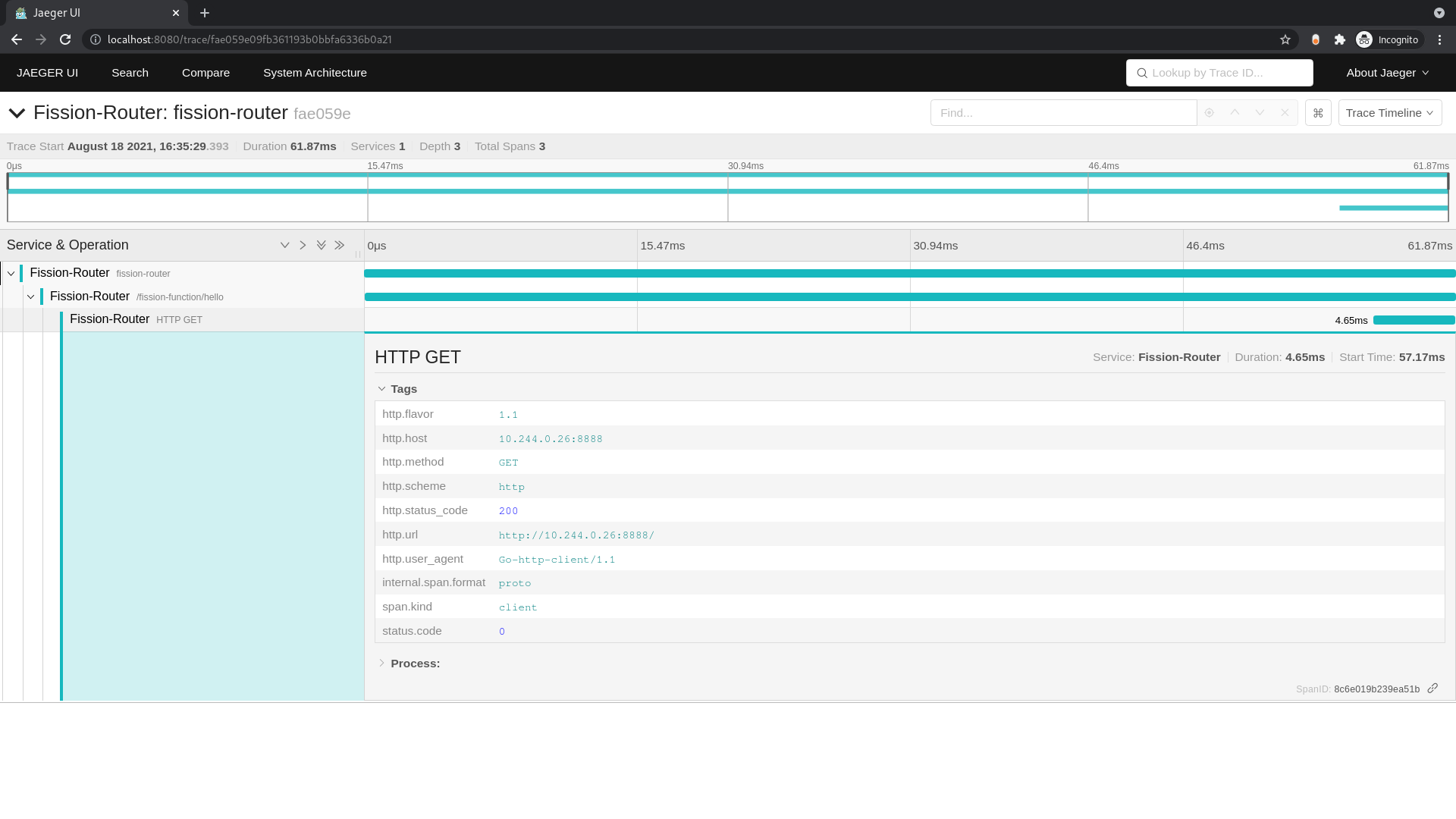
You should see the spans created for the function request we just tested.
Select the trace and on the next page expand the spans.
You should be able to see the request flow similar to the one below:
If you enable OpenTelemetry tracing within your function, you can capture spans and events for the function request.
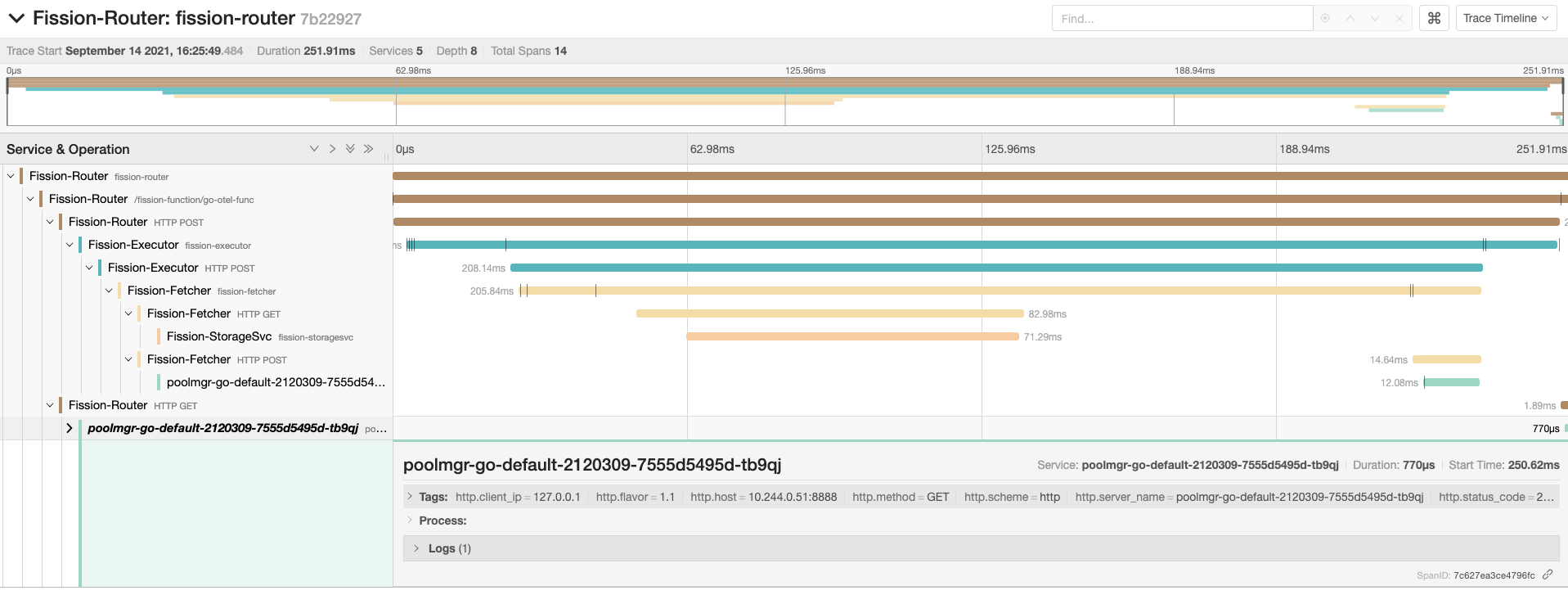
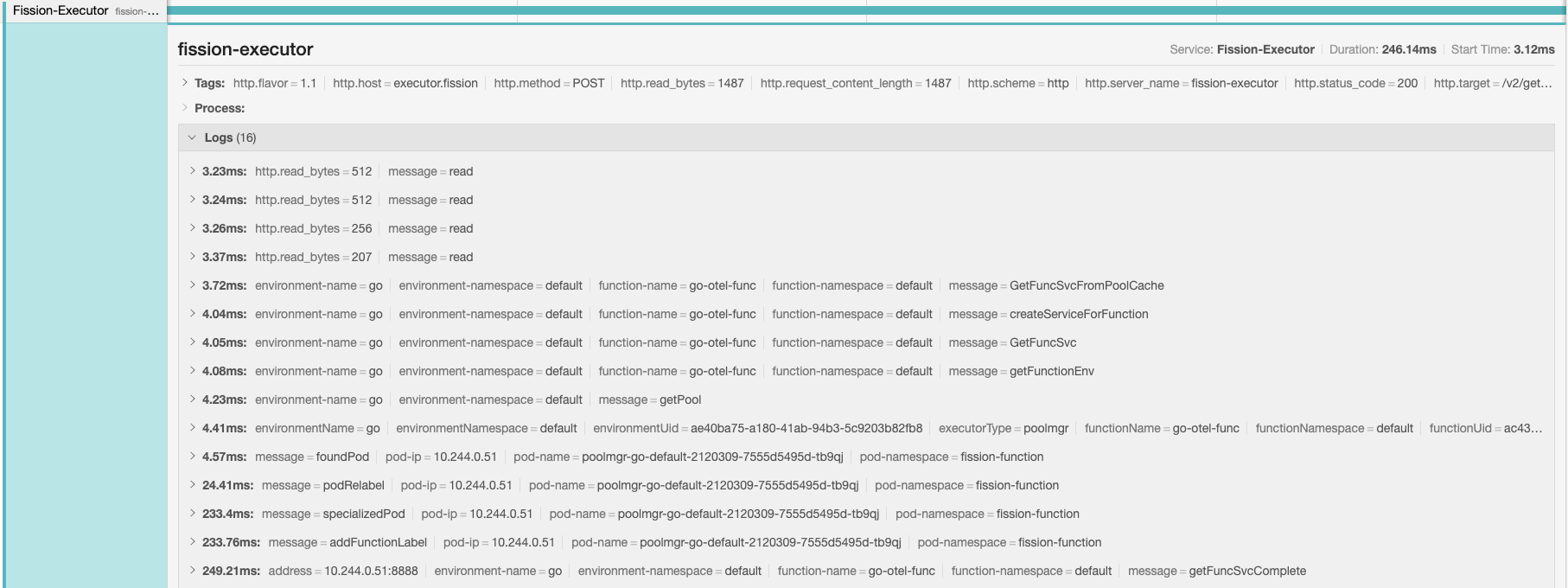
Following are few samples of spans and events captured by invoking a Go base function: